
 Jackett lets you use a bunch of additional torrent providers with Sonarr. It turns your Windows home media server into a Torznab API server which Sonarr can interact with. Jackett queries the torrent providers and supplies information to Sonarr for processing. The list of compatible torrent providers can be found here. This guide was tested on Windows 7, 8 and 10 as has the Jackett Windows system service so you will be all set after this Jackett for Windows guide.
Attention: If you want to build an older Jackett with public torrent providers see this guide
Note the Jackett that supports public trackers is here.
| VPN Service | ||||
|---|---|---|---|---|
| Private Internet Access | ($3.33 / month) | |||
| Pure VPN | ($4.91 / month) | |||
| IPVanish | ($6.41 / month) |
Install Jackett for Custom Torrents in Sonarr
If you are on Windows 7 you will need the latest .NET framework available here
Download the latest Jackett release which is currently 0.69 but a newer (release may be available)
Install Jackett by downloading and running Jackett.Installer.Windows.exe
Create Jackett Windows System Service
If you are using the public version of Jackett from raspfinder then you can install the windows system service with this command as an administrator (source)
JackettConsole.exe -iEdit: Jackett now creates a system service during the install process so you can skip nssm
Install nssm which lets you create custom Windows services.
Download NSSM, the latest stable release is a ideal which includes 32-bit and 64-bit versions.
Open the nssm.zip and go into either the Win32 (32-bit) or Win64 (64-bit) folder depending on your Windows version.
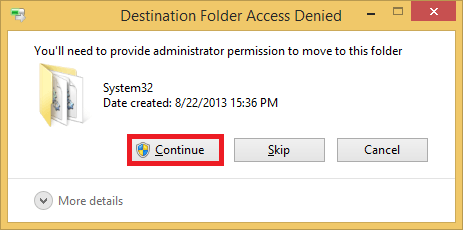
Copy the nssm.exe to your C:\Windows\System32 folder so it is part of your PATH which allows you to run commands from any directory in the command prompt without having to be in the executable’s actual path. You will get a warning about needing permission, grant it.
Run a command prompt as Administrator
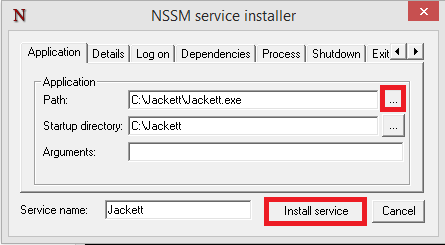
nssm install JackettFor your Path, click … and choose C:\Jackett\JackettConsole.exe
Click Install Service
If you want to start the Jackett service now right click My Computer or This PC and choose Manage
Click Services, scroll down in the right pane until you see Jackett, right click and choose Start
Now you can access Jackett on port 9117 using your local IP address, http://ip.address:9117 and now configure Jackett.
Treat yo' self to a new gadget!
| Amazon Item | |||
|---|---|---|---|
| Amazon Fire TV | |||
| Amazon Fire TV Stick | |||
| Chromecast | |||
| Roku 3 | |||
| Raspberry Pi 3 |
| Get More HTPC Goodness! No Spam just Torrent, Usenet, Pi and Media Server Automation | |
|---|---|
Related Posts
 Install Jackett Ubuntu 15.x for Custom Torrents in Sonarr
- Build Older Jackett from Source for Windows + Linux + Mac
- Add Custom Torrent Trackers in Sonarr using Jackett Guide
- Install Radarr on Windows with System Service
- Install Jackett Debian Linux for Custom Torrents in Sonarr
- Install Jackett on Ubuntu 14.x for Custom Torrents in Sonarr
- Create SickRage Windows System Service v2
- Create Sabnzbd System Service on Windows