
 OpenMediaVault is an excellent NAS software solution, it has an easy-to-use graphical web interface for simple installation and management of many desirable plugins such as SickRage, Sabnzbd, MiniDLNA, NZBGet and Transmission. It is recommended to install OpenMediaVault on a clean, unaltered image. This guide has been tested on the Raspberry Pi 2 but should also work on other Pi models and any device running OpenMediaVault. If you have not installed OpenMediaVault yet, follow the installation guide for the Pi 2 here before proceeding.
| Pi Unit | ||||||||
|---|---|---|---|---|---|---|---|---|
| Raspberry Pi 3 | Quad Core | |||||||
| Raspberry Pi 2 | Quad Core | |||||||
| Raspberry Pi | Single Core | |||||||
| Banana Pi | Dual Core | |||||||
| Banana Pi Pro | Dual Core |
Install MiniDLNA Plugin OpenMediaVault
Installing plugins is done through OpenMediaVault’s web interface. Open a web browser and go to the IP address of your Raspberry Pi, the default user name is admin and the default password is openmediavault.
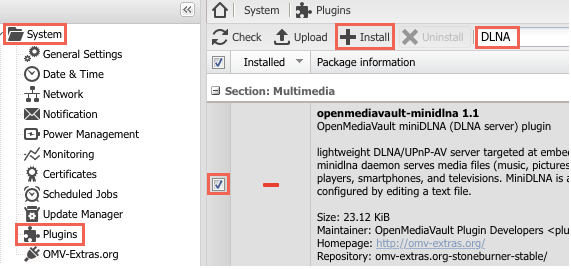
Go to System > Plugins and type DLNA as your search term, find the correct plugin, mark the checkbox next to it and click Install
Confirm that you would like to install the plugin, click Yes
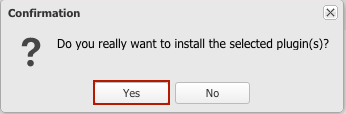
This will install the MiniDLNA plugin on OpenMediaVault. After the plugin is installed, it must be enabled.
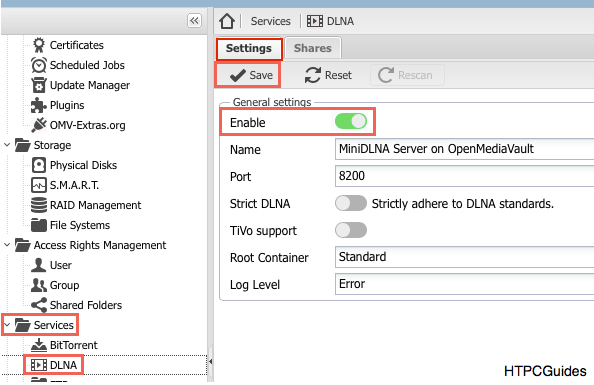
While in the OMV web interface, go to Services > DLNA > Settings tab > select Enable > click Save
Add shared folders to MiniDLNA by clicking on Services in the left pane > DLNA > Shares > click Add > select desired shared folder > select content type > click Save
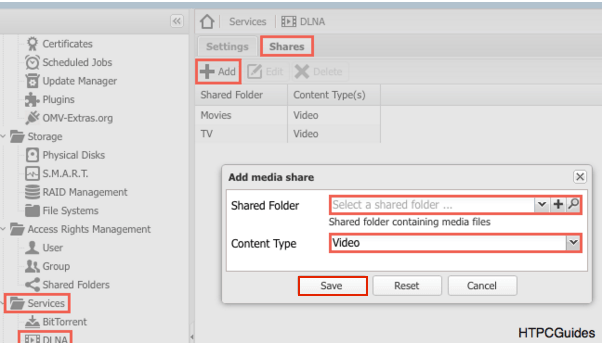
Here you also have the option to limit what file types it will search for in the different folders. Since there is no data on our disks yet, we don’t need the rescan button. But if needed, it’s placed on the DLNA Settings tab and can force a rescan of your entire library content.
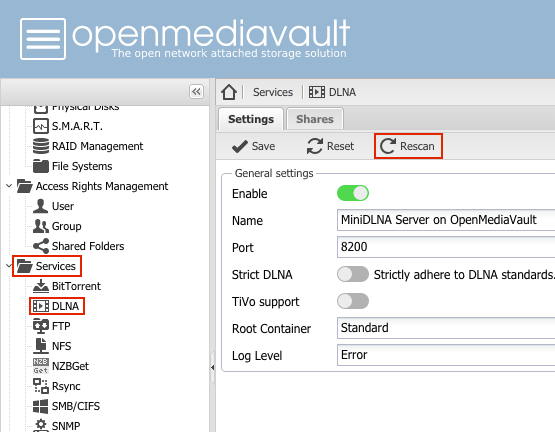
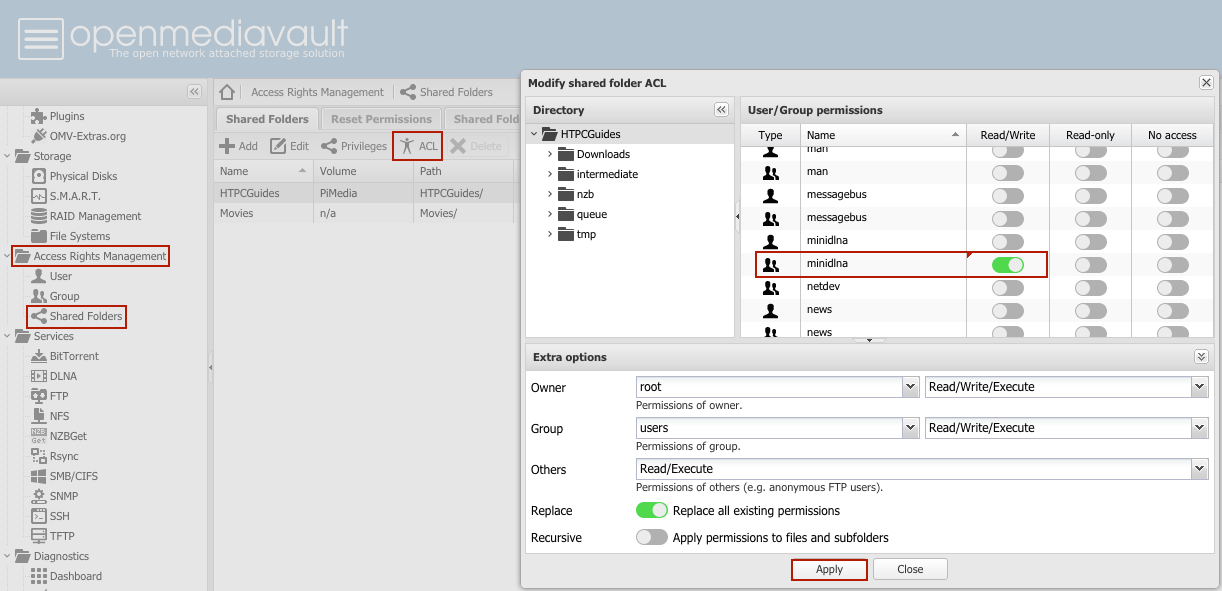
Finally, you must give the group minidlna access to the shared folders of your choosing.
Go to Access Rights Management > Shared Folders > highlight the shared folder which it should have access to.
Click ACL > find the minidlna group and grant it permissions > click Apply
You have installed MiniDLNA on OpenMediaVault so you can begin using this lightweight media server.
Treat yo' self to a new gadget!
| Amazon Item | |||
|---|---|---|---|
| Amazon Fire TV | |||
| Amazon Fire TV Stick | |||
| Chromecast | |||
| Roku 3 | |||
| Raspberry Pi 3 |
| Get More HTPC Goodness! No Spam just Torrent, Usenet, Pi and Media Server Automation | |
|---|---|
Related Posts
 Install Transmission Plugin OpenMediaVault
- Install SABnzbd Plugin OpenMediaVault
- Install CouchPotato Plugin OpenMediaVault
- Install SickRage Plugin OpenMediaVault
- Create Shared Folders OpenMediaVault for USB Hard Drives
- Upgrade OpenMediaVault on Raspberry Pi 2
- Install OpenMediaVault Raspberry Pi NAS Server Minibian
- Install OpenMediaVault on Banana Pi Pro with Bananian